Takes
Shoot takes, talk to your editor between them
Coming Soon on the App Store
Leave your email and we'll tell you when it's ready. One note, nothing else.


The camera never stops. One button decides whether what you're saying is a take or a note to whoever cuts the video, and both get recorded, transcribed, and filed together.
One button. Take or note
The camera never stops between them.

Every take, with your notes on it
Transcribed on the phone, searchable later.
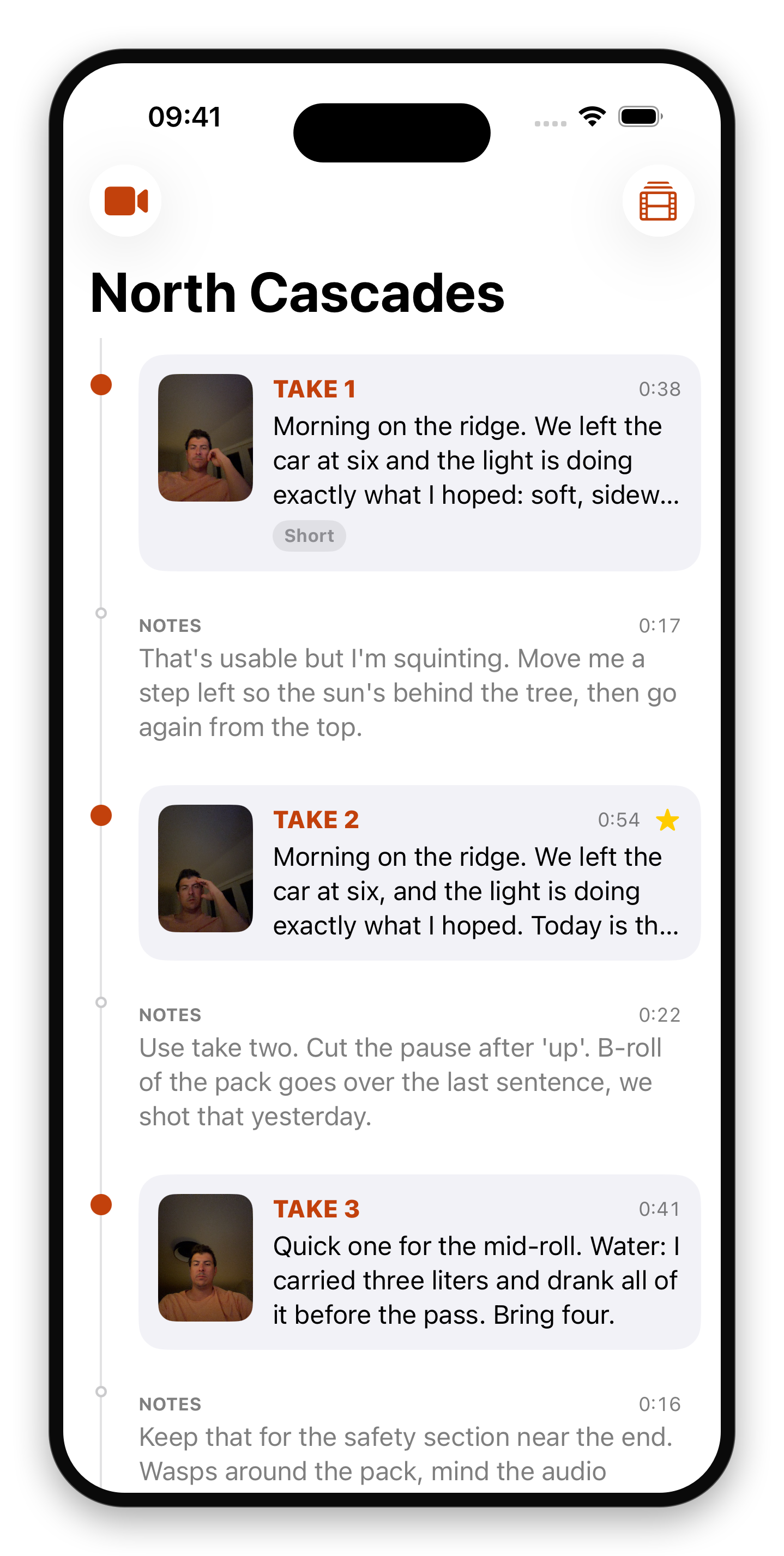
Watch a take, read the direction
What you meant, before and after.

A project is a folder of takes
Start one, add to it whenever.

Shoot once. Crop later
The whole sensor is recorded. The guides show the crop.

The camera keeps rolling
Other camera apps make you stop and start. Takes records continuously; the button only chooses what the current stretch of video is. Press it for a take. Press it again and you're talking to your editor.
That in-between talk is usually lost, and it's the most useful thing you say all day: "too slow, use the second half," "I flubbed the name, cut before it," "run this one under the b-roll." Takes keeps it, in your voice, next to the take it's about.
Notes become instructions
Each clip is transcribed on the phone when it ends, and Takes uploads nothing. Open a take later and the notes from before and after it are right there, searchable. An hour of unlabeled video becomes a list of takes with your own direction attached.
Made for a gimbal
On a DockKit gimbal, the shutter button switches between take and notes, so you never reach for the screen to start a take. Zoom, flip, and tracking keep doing whatever the gimbal does with them.
Shoot once, crop later
Takes records the full sensor frame. The guides show what a landscape or portrait crop would keep, so one take can serve both, and the choice is written into the video file for your editor.
Problems, while you can still reshoot
A meter shows whether the sound is too soft, right, or clipping, and which microphone is recording. Clips are flagged as they finish (silent, clipping, blown out) and notes where you said nothing are discarded on their own.
Your footage, in a folder
A project is a folder: one video per take and per note, a thumbnail, a transcript, and a JSON index. No library, no import, no export. Hand it to an editor and everything is where they'd expect.
Details
- Continuous recording, split into a file per take and per note
- Front or back camera, and flipping mid-shoot cuts cleanly to a new take
- Full-sensor capture with orientation and framing written to each file
- Transcription runs on the phone, and Takes uploads nothing
- DockKit gimbal shutter support
- Sound meter with microphone switching
- Automatic flags for silence, clipping and exposure
- Projects are plain folders, visible in the Files app
Requirements
- iPhone running iOS 26 or later
- A DockKit gimbal is optional: the on-screen button does the same job
Want it the day it ships?
One email, on the day it's on the App Store. No newsletter, no drip, and you can unsubscribe from the link in that email.
Coming Soon on the App Store
Leave your email and we'll tell you when it's ready. One note, nothing else.